


Guide
Electrolux Refrigerator Not Dispensing Ice: A Step-by-Step Ice-Path Check
When a refrigerator makes ice but will not dispense it, the cause is usually in the dispensing side: a display lock, an empty or unseated bin, doors not fully closed, or ice that melted and refroze around the auger. Check those in order, and stop short of forcing the bin or the auger.
Electrolux Refrigerator Not Dispensing Ice
A refrigerator can make ice normally and still fail to dispense it. That distinction matters because the problem may be in the bin, auger, chute, dispenser controls, or a simple lock setting rather than the ice-making system.
Start with the checks you can perform from outside the appliance. If the symptom is tied to water, heat, gas, electricity, or moving parts, stop when the condition becomes unsafe rather than repeatedly testing the appliance. The exact diagnostic path can vary by model, so keep the full model number available.
| Symptom | What it can point to | What you can check |
|---|---|---|
| Nothing comes out, bin has ice | Display lock on, or doors not fully closed | Unlock the display; close both doors firmly |
| Dispenser stopped after heavy use | Motor overload protection after a long press | Wait a few minutes and try again |
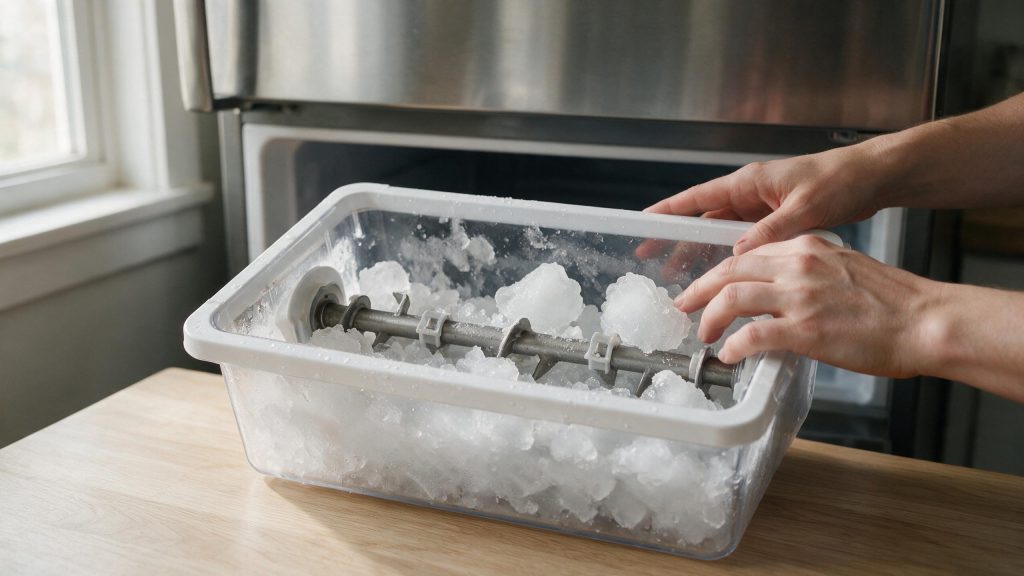
| Motor sounds but ice does not move | Ice frozen into a clump at the auger | Remove the bin and check for a clump |
| Bin is empty | Ice maker problem, not a dispensing problem | Check the ice maker and the water filter |
Confirm the Display Is Unlocked
One of the first possibilities is display lock enabled. Unlock the refrigerator controls if the display lock is active. This is useful because it rules out a condition that can imitate a component problem without requiring disassembly.
Make Sure the Ice Bin Has Ice
Next, consider empty or incorrectly seated ice bin. Confirm the ice bin actually contains loose ice and is fully seated. Look for a clear change in behavior rather than making several adjustments at the same time.
Lock Settings and Overuse Protection
The use-and-care manual for one Electrolux refrigerator says the dispenser display can be locked by holding CUBE and CRUSH for 3 seconds, and when it is locked neither water nor ice can be dispensed. The same manual says the dispenser will not dispense if the doors are not fully closed, or if the paddle was pressed so long that the motor overheated, and that the overload protector resets in about three minutes.
Check for Melted and Refrozen Ice
Another common branch is ice jammed around the auger or chute. Remove the bin and look for clumped, melted, or refrozen ice that can prevent auger movement. If the symptom began immediately after installation, cleaning, a power event, or moving the appliance, that timing is especially useful.
Reseat the Ice Bin Carefully
Do not overlook dispenser overuse protection. Make sure refrigerator doors are fully closed before testing the dispenser. If that check is normal, the remaining causes move farther toward internal components or controls.
Why Ice Jams Around the Auger
The manual for one model says ice can melt and refreeze around the auger from infrequent use, temperature swings or power outages. Its remedy is to remove the bin, thaw and empty it, clean and dry it, then replace it.
If the bin is seated, the ice is loose and the lock is off but nothing comes out, the auger motor, paddle switch or wiring needs testing.
Common Questions
How do I unlock the ice dispenser?
The manual for one Electrolux model describes locking and unlocking by holding CUBE and CRUSH for 3 seconds. Your own manual gives the sequence for your display.
Why did the dispenser stop after I held it down?
The manual for one model says the motor can overheat if the paddle is pressed too long and that the overload protector resets in about three minutes. Wait, then try shorter presses.
Why is the ice stuck in a clump?
Infrequent use, temperature swings or a power outage can let ice melt and refreeze. Thawing and emptying the bin, as the manual describes, clears it.
Safe Troubleshooting Checklist
- Unlock the refrigerator controls if the display lock is active.
- Confirm the ice bin actually contains loose ice and is fully seated.
- Remove the bin and look for clumped, melted, or refrozen ice that can prevent auger movement.
- Make sure refrigerator doors are fully closed before testing the dispenser.
- After clearing a jam, reinstall the bin without forcing the auger mechanism.
- Display lock enabled.
- Empty or incorrectly seated ice bin.
- Ice jammed around the auger or chute.
- Dispenser overuse protection.
- Auger motor, paddle switch, wiring, or control issue.
- Electrolux Refrigerator Repair
- Electrolux Refrigerator Error Codes
- Electrolux Refrigerator Not Cooling: What to Check Before You Book Repair
- Electrolux Ice Maker Not Making Enough Ice: Common Causes and Safe Checks
- Electrolux Refrigerator Not Cooling: What to Check Before You Book Repair
- Electrolux Ice Maker Care: Preventing Slow or Low Ice Production
- Electrolux Refrigerator Water Dispenser Not Working: What You Can Check
Common Causes to Keep in Mind
Use a Repeatable Troubleshooting Sequence
Change one condition at a time and record the result. Confirm the operating mode or setting, compare a related function that still works normally, perform one safe external check, and then reassess.
If the same symptom remains, do not keep adding resets or random parts. Record the complete model number and any displayed code before power is interrupted. That gives a technician a cleaner starting point.
When the Dispenser Needs Service
Stop if the auger grinds repeatedly, the bin will not seat normally, or you see broken plastic or water leaking around the dispenser. If the dispenser still does not move ice with a correctly seated bin and clear chute, schedule refrigerator repair. The auger motor, switch, wiring, and dispenser controls may need testing. Clear notes about what changed, when the symptom appears, and what you already checked can make the service visit more efficient.
What to Tell the Technician
Provide the full model number, when the symptom started, whether it happens every cycle or only under certain conditions, and any display message or error code you have seen. Mention recent installation work, power outages, plumbing changes, filter changes, or unusual noises. Those details help separate a setup issue from a component or control problem.
FAQ
Can a locked display stop the ice dispenser?
Yes. Electrolux lists the display lock as one of the first things to check.
Why does ice jam in the bin?
Ice can melt and refreeze after temperature changes, power outages, or infrequent use, causing cubes to bind around the auger.
Should I turn the auger by force?
No. Avoid forcing the auger or mechanism; reseat the bin according to the owner guide.
Related Electrolux Repair Resources
Similar Articles
Keep reading
Similar articles
Electrolux Microwave Vent Fan Keeps Running: A Step-by-Step Heat and Control Check
A vent fan that keeps running on an Electrolux over-the-range microwave is often the microwave protecting itself from heat that rises off the cooktop…
Electrolux Dryer Takes Too Long to Dry: A Step-by-Step Airflow Check
When an Electrolux dryer takes too long to dry, the cause is nearly always that damp air cannot leave the drum fast enough: a…
Electrolux Washer Draining Slowly: A Step-by-Step Drain Check
A slow-draining Electrolux washer most often comes down to the path after the pump: a kinked drain hose, a standpipe that is too tall…
Book a repair
Tell us what’s wrong — we’ll take it from there
Share a few details and we’ll confirm an appointment. Prefer to talk? Call us and we’ll help right away.
Address
We operate in California, Florida, New York, and Texas.
Phone
(844) 917-2115
Hours
Mon–Fri 8:00 AM – 6:00 PM · Sat 9:00 AM – 2:00 PM
Service area
We currently serve the Miami, New York, Houston, Los Angeles and San Diego metro areas, including many surrounding communities.
Response time
Same-day and next-day appointments are often available — confirm with your ZIP code.
Directions
View on map
Request your repair
Fields marked with * are required.