


Guide
Electrolux Refrigerator Freezing Food: A Step-by-Step Temperature Check
Food freezing in the fresh-food section most often comes down to a setting that was turned too cold or food sitting against the cold-air path, not a failed part. Return the control to a normal range, pull items away from vents and the sensor area, then give the cabinet time before judging the result.
Electrolux Refrigerator Too Cold or Freezing Food
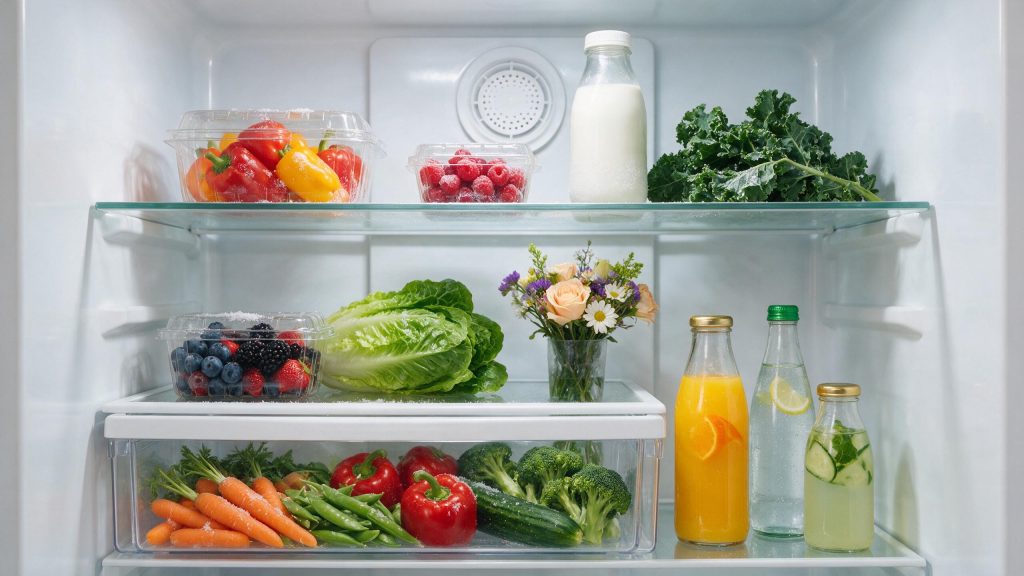
A refrigerator can cool too much as well as too little. If produce, drinks, or dairy are freezing in the fresh-food section, start by checking the setpoint and where those items are placed relative to cold-air vents.
Start with the checks you can perform from outside the appliance. If the symptom is tied to water, heat, gas, electricity, or moving parts, stop when the condition becomes unsafe rather than repeatedly testing the appliance. The exact diagnostic path can vary by model, so keep the full model number available.
| Symptom | What it can point to | What you can check |
|---|---|---|
| Drinks or produce frozen at the back | Food against the cold-air vents | Move items forward and keep air ports clear |
| Everything in the compartment too cold | Setpoint lowered, or sensor covered by food | Raise the setting a step; keep the sensor area clear |
| Drawers freezing on a French-door model | Control set too cold for drawer contents | Adjust warmer and wait before changing again |
| Cold keeps getting colder after changes | Sensor, damper or control fault | Note the setting and the symptom; book a diagnosis |
Verify the Temperature Setting
One of the first possibilities is temperature set too cold. Review the fresh-food temperature setting and return it to a normal range if it was lowered. This is useful because it rules out a condition that can imitate a component problem without requiring disassembly.
Move Food Away From Air Vents
Next, consider food placed directly in the cold-air path. Move sensitive foods away from direct contact with vents. Look for a clear change in behavior rather than making several adjustments at the same time.
What the Manual Gives as a Normal Range
The use-and-care manual for one Electrolux refrigerator recommends fresh-food temperatures of 37 to 40 F, with 37 F as the optimum, and a freezer at 0 F or lower. It also asks owners not to overcrowd shelves or block air ports. A fresh-food compartment set near the cold end of that range with a full, tightly packed shelf can freeze items near the vents even when nothing is wrong with the refrigerator.
Check Airflow Through the Cabinet
Another common branch is blocked vents disrupting circulation. Keep interior vents clear so air can mix through the cabinet. If the symptom began immediately after installation, cleaning, a power event, or moving the appliance, that timing is especially useful.
Give Changes Time to Stabilize
Do not overlook temperature sensor issue. After changing the temperature, allow time for the refrigerator to stabilize before making another adjustment. If that check is normal, the remaining causes move farther toward internal components or controls.
The Sensor and the Drawers
The manual for one model says food freezing in the fresh-food compartment can come from a setting that is too low, food covering the sensor on the right side of the fresh-food area, or food covering the air ports. The remedy it gives is to raise the setting and leave space for airflow. The manual for a French-door model adds that drawer contents freeze when the refrigerator control is too cold, and that ice crystals on meat in the Meat Keeper are normal.
If the setting is normal, nothing covers the sensor or ports, and food still freezes after the cabinet has had time to settle, the sensor, air damper or control board needs model-specific testing.
Common Questions
What temperature should the fresh-food section be?
The manual for one Electrolux refrigerator gives 37 to 40 F, with 37 F as optimum. Check your own manual, and use a refrigerator thermometer if you want to confirm the actual cabinet temperature.
Why does food freeze only near the back wall?
Cold air enters the compartment through vents there, so items touching them are exposed to the coldest air. Moving them forward often solves it.
Are ice crystals on meat a fault?
In the Meat Keeper of one French-door model, the manual describes ice crystals on meat as normal. Frozen food in the other drawers is a sign the control may be set too cold.
Safe Troubleshooting Checklist
- Review the fresh-food temperature setting and return it to a normal range if it was lowered.
- Move sensitive foods away from direct contact with vents.
- Keep interior vents clear so air can mix through the cabinet.
- After changing the temperature, allow time for the refrigerator to stabilize before making another adjustment.
- Monitor actual cabinet temperature with a refrigerator thermometer if needed.
- Temperature set too cold.
- Food placed directly in the cold-air path.
- Blocked vents disrupting circulation.
- Temperature sensor issue.
- Air damper or electronic control problem.
- Electrolux Refrigerator Repair
- Electrolux Refrigerator Error Codes
- Electrolux Refrigerator Not Cooling: What to Check Before You Book Repair
- Electrolux Ice Maker Not Making Enough Ice: Common Causes and Safe Checks
- Electrolux Refrigerator Not Cooling: What to Check Before You Book Repair
- Electrolux Ice Maker Care: Preventing Slow or Low Ice Production
- Electrolux Refrigerator Water Dispenser Not Working: What You Can Check
Common Causes to Keep in Mind
Use a Repeatable Troubleshooting Sequence
Change one condition at a time and record the result. Confirm the operating mode or setting, compare a related function that still works normally, perform one safe external check, and then reassess.
If the same symptom remains, do not keep adding resets or random parts. Record the complete model number and any displayed code before power is interrupted. That gives a technician a cleaner starting point.
When Overcooling Needs Repair
Stop repeated setting changes if the cabinet remains far below the selected temperature or other cooling symptoms appear. If food continues freezing despite normal settings and clear vents, book refrigerator repair. Sensor feedback, airflow control, or the electronic control system may need diagnosis. Once the external checks are exhausted, model-specific testing is more useful than repeated resets or trial-and-error parts replacement.
What to Tell the Technician
Provide the full model number, when the symptom started, whether it happens every cycle or only under certain conditions, and any display message or error code you have seen. Mention recent installation work, power outages, plumbing changes, filter changes, or unusual noises. Those details help separate a setup issue from a component or control problem.
FAQ
What refrigerator setting does Electrolux suggest?
Electrolux support commonly cites 37°F for the refrigerator and 0°F for the freezer as suggested settings for kitchen installation.
Why does food freeze near a vent?
Air leaving the vent is colder than the average cabinet temperature, so items directly in that path can freeze first.
How quickly should I change the setting again?
Avoid rapid repeated adjustments; allow the cabinet time to stabilize after each change.
Related Electrolux Repair Resources
Similar Articles
Keep reading
Similar articles
Electrolux Microwave Vent Fan Keeps Running: A Step-by-Step Heat and Control Check
A vent fan that keeps running on an Electrolux over-the-range microwave is often the microwave protecting itself from heat that rises off the cooktop…
Electrolux Dryer Takes Too Long to Dry: A Step-by-Step Airflow Check
When an Electrolux dryer takes too long to dry, the cause is nearly always that damp air cannot leave the drum fast enough: a…
Electrolux Washer Draining Slowly: A Step-by-Step Drain Check
A slow-draining Electrolux washer most often comes down to the path after the pump: a kinked drain hose, a standpipe that is too tall…
Book a repair
Tell us what’s wrong — we’ll take it from there
Share a few details and we’ll confirm an appointment. Prefer to talk? Call us and we’ll help right away.
Address
We operate in California, Florida, New York, and Texas.
Phone
(844) 917-2115
Hours
Mon–Fri 8:00 AM – 6:00 PM · Sat 9:00 AM – 2:00 PM
Service area
We currently serve the Miami, New York, Houston, Los Angeles and San Diego metro areas, including many surrounding communities.
Response time
Same-day and next-day appointments are often available — confirm with your ZIP code.
Directions
View on map
Request your repair
Fields marked with * are required.